Juniper SA & Terminal Server with Novell Client SSO

Normally configuring SSO on a Terminal Server in conjunction with a Juniper SA isn’t that hard. On the Juniper you pass the user credentials to the Terminal Server. On a normal Terminal Server you have to check the following:
Disable Always prompt for password under:
Terminal Services Configuration –> Connections –> Properties of RDP-tcp –> Tabblad Logon Settings
On a Terminal Server, which is member of a Windows Domain, you have to check the following Group policy:
Disable Always prompt client for password upon connection under:
Computer Configuration –> Administrative Templates –> Windows Components –> Terminal Services –> Encryption and Security –> Policy “Always prompt client for password upon connection”
Now I had to configure Single Sign On to a Terminal Server where the Novell Client is installed. As soon as I pushed the user credentials to the Terminal Server, I noticed that the RDP session tries to logon as Workstation only. I found a nice thread on the Novell website to Enable TSClientAutoAdminLogon.
I added the following two registry keys to the registry:
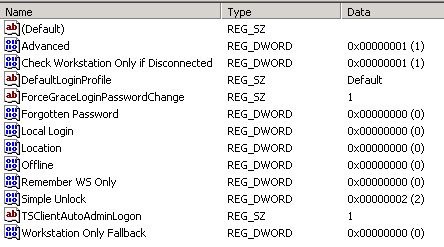
HKEY_LOCAL_MACHINE\SOFTWARE\Novell\Login
Value Type=REG_SZ, Name=TSClientAutoAdminLogon, Data=1
Value Type=REG_SZ, Name=DefaultLoginProfile, Data=Default
I am able to logon to the Terminal Server using SSO after adding both registry keys to the registry. All registry entries under HKEY_LOCAL_MACHINE\SOFTWARE\Novell\Login are displayed in the picture below.


René Jorissen
Latest posts by René Jorissen (see all)
- MacOS Big Sur and SSLKEYFILELOG - November 23, 2021
- ClearPass, Azure AD, SSO and Object ID - August 12, 2021
- ClearPass – custom MPSK - July 20, 2021