Secret Barracuda Spam firewall options

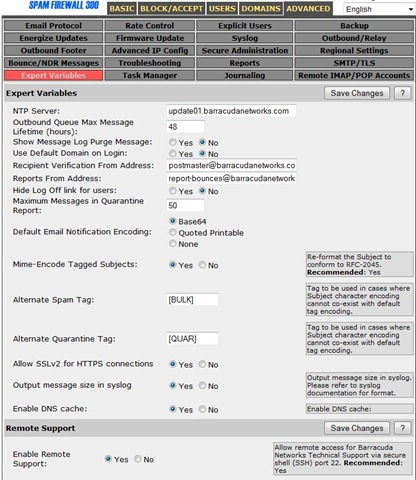
While troubleshooting a Barracuda Spam Firewall 300 I found a forum on internet, which shows you how to get an extra tab under the Advanced configuration of the Barracuda Spam Firewall. The “secret” configuration page is enabled with the following steps:
- Logon to the Barracude Spam Firewall 300;
- Click on the Advanced tab;
- Add &expert=1 at the end of the URL and hit enter;
You will now get the extra tab Expert Variables like shown below.
The following two tabs change content below.


René Jorissen
Co-owner and Solution Specialist at 4IP Solutions
René Jorissen works as Solution Specialist for 4IP in the Netherlands. Network Infrastructures are the primary focus. René works with equipment of multiple vendors, like Cisco, Aruba Networks, FortiNet, HP Networking, Juniper Networks, RSA SecurID, AeroHive, Microsoft and many more. René is Aruba Certified Edge Expert (ACEX #26), Aruba Certified Mobility Expert (ACMX #438), Aruba Certified ClearPass Expert (ACCX #725), Aruba Certified Design Expert (ACDX #760), CCNP R&S, FCNSP and Certified Ethical Hacker (CEF) certified.
You can follow René on Twitter and LinkedIn.
Latest posts by René Jorissen (see all)
- MacOS Big Sur and SSLKEYFILELOG - November 23, 2021
- ClearPass, Azure AD, SSO and Object ID - August 12, 2021
- ClearPass – custom MPSK - July 20, 2021