Configuration Example, Wireless
AeroHive Spectrum Analysis

One cool feature about AeroHive is the build-in Spectrum Analysis feature, which is enabled by default from HiveOS 4 and higher. Spectrum analysis is very useful to get a view of the RF environment near an access-point. This is especially useful when troubleshooting bad connections (high volume of retransmissions) or other problems related to the RF environment. A spectrum analysis can help to detect interfering components, like bluetooth devices, cellular phones or a micro wave.
HiveAPs even have the possibility to recognize device types, which interfere with the wireless environment. Device identification is only possible with HiveAP 110, 120 and 170 access-points. The HiveAP 320 and 340 cannot perform any kind of spectrum analysis and the HiveAP 330 and 350 can perform a spectrum analysis, but don’t have the device identification feature.
To perform a spectrum analysis with AeroHive, you need to configure at least one SSID. When the SSID is configured you have the option to perform the analysis in both the 2.4 Ghz and the 5 Ghz band.
To start the analysis, open the HiveManager, click Monitor – Access Points – HiveAPs and select a HiveAP, then click Tools – Spectrum Analysis to begin the spectrum analysis. The screenshot below shows the spectrum analysis pane.
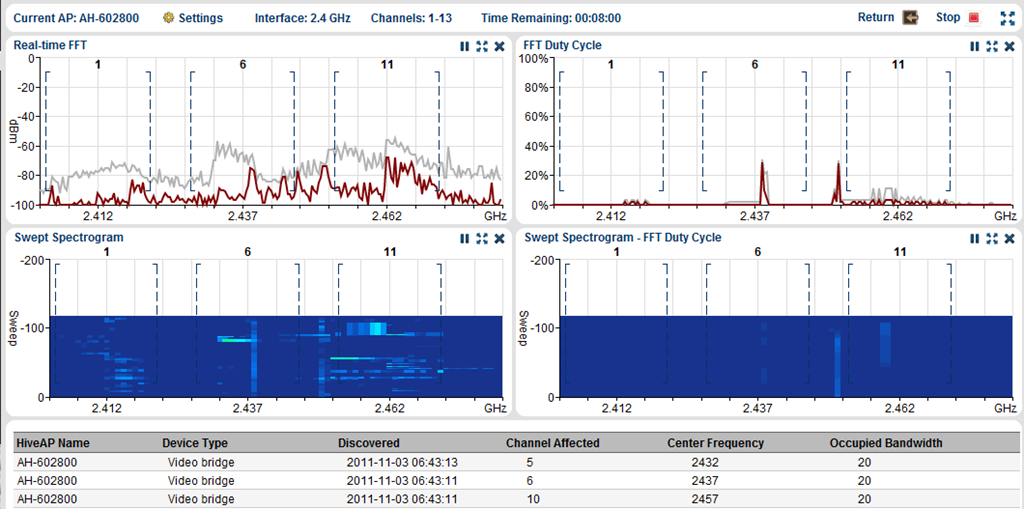
A full description of the different panes can be found in the online HiveManager WebHelp. I like the spectrum analysis feature, because of it’s power and strength during troubleshooting and planning of a wireless environment.


René Jorissen
Latest posts by René Jorissen (see all)
- MacOS Big Sur and SSLKEYFILELOG - November 23, 2021
- ClearPass, Azure AD, SSO and Object ID - August 12, 2021
- ClearPass – custom MPSK - July 20, 2021