Cisco ASA remote management via VPN

By default, remote access VPN users aren’t able to manage a Cisco ASA firewall on the inside interface using any kind of management protocol (SSH, telnet, HTTPS).
You can enable remote management by specifying the management-access interface. You can specify the interface via the CLI or via the Cisco Adaptive Security Device Manager (ASDM). Both methods are specified below.
CLI
fw01/booches.nl/act# configure terminal
fw01/booches.nl/act(config)# management-access inside
ASDM
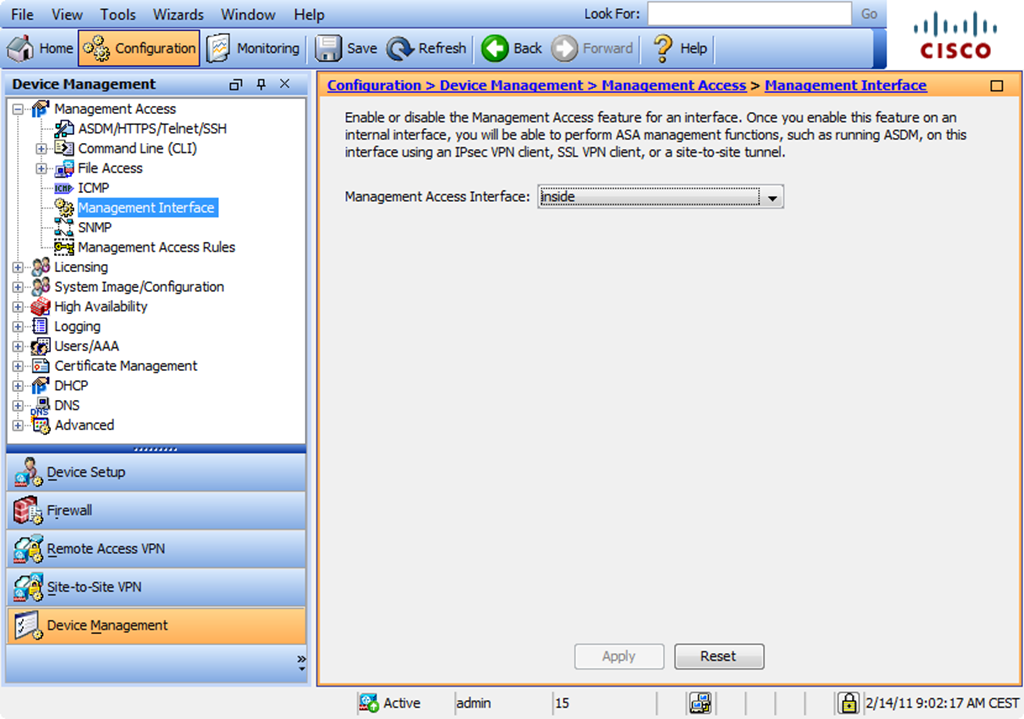
When using the Management Access feature with remote VPN connections (IPSec or SSL VPN) don’t forget to add the VPN pool to the corresponding management access protocols on the interface you specified as management access interface


René Jorissen
Latest posts by René Jorissen (see all)
- Aruba AOS 10 and Mesh Networking - January 28, 2026
- Deploy HPE 9106 gateways - January 20, 2026
- Uninstalling the HPE Axis Connector on Ubuntu - December 17, 2025
Cisco ASA remote management via VPN
Hello René,
I have been trying to work out how to do this for some time. Thanks very much for posting this – I am very grateful.
Kind Regards
Jezz
Can you give an example?
How would you remotely access asa over a site-site vpn?
The vpn pool or remote subnet (site-site vpn) will be coming from outside interface yes?
LMathews,
You have to specify the VPN pool on the interface you set as management interface. I normally configure inside as management interface.